Then, as usually happens, I went down to my office and got caught up in my work.
Next thing I know, I hear a screech on my phone.
I look and it says “Nest Emergency-Smoke.”
I ran upstairs to see that my pan was burnt.
Yes, I love my Nest Protect.
To keep in touch, generate conversation (and a hint of controversy), and opine.
I just love the power of social and digital to keep relationships alive over time and distance.
When I was in London recently, I saw my former NYC neighbor, Polar Bear club member, and running partner, Robyn Massey for the first time in 13 years.
Without technology, there's NO way we would have stayed in touch.
This is one of the reasons why I am so passionate about technology.
I can’t say this any more softly than I am about to.
If you are on a contract plan for your phone with less than 5 months to go OR are out of contact but with one of the major carriers, well then, you are making a huge mistake.
Why?
That’s it.
What do you get?
The era of contract phones is over. Even the big carriers have realized this.
May as well make the move and reap the benefits.
If it’s happening to cab drivers, it can happen to anyone.
Customers-in aggregate-now have more power than the businesses.
The Backstory
At BWI rail station, cabs wait to pounce on stranded or time-constrained passengers, charging exorbitant fees to take advantage of a stressful situations.
It’s cause for resentment, but what can you do?
Disruption Awakening
While waiting to pick up a colleague, I started to chat with some of the cabbies and the talk turned to their business practices, how they decided what to charge whom.
“You know that you guys have a pretty bad reputation, right?”
They looked surprised.
I pulled out my phone and showed them my recent Foursquare check-in, where the tips frequently discussed how to deal with the predatory cab practices.
They were floored. “What’s the name of this app? I need to download it.”
It Is Happening to Everyone
EVERY organization and every industry deals with people. Those people have a voice that can be heard everywhere and at zero marginal cost.
NOT hearing the voice and engaging in a conversation with it leads down a lonely path.
Note: Sprinklr integrates with Foursquare so large companies can see who is checking-in and connect that information with the same person’s behavior on other social networks. In that way, they know if someone checks in at a store, it is the same person who tweeted last week about loving sweaters (or whatever it might be. You get the picture.)
Every now and then, with all of the excitement that surrounds the potential for social media in business, politics, etc., you forget what makes it so amazingly powerful.
Creating and solidifying connections between people.
It’s so simple. And it’s at the core of al the potential, but it gets lost in terms like “reach” and “engagement.”
The other day, however, I had a moment that brought me back, reminding me of the inherent beauty of the democratization of communication.
Five years ago, my friend Tom Harshbarger said, “there’s a guy you need to meet. His name is Brent Leary.”
Since then, Brent and I connected in many ways…email, phone, text, blogs, Facebook, Twitter, LinkedIn, podcast interviews, Google+, Foursquare…you get the picture.
But, we had never actually met in person.
Until August 27th, 2013.
I gave Brent the heads up that I would be in Atlanta and he joined me for the event. Here is the video commemorating the moment and serving as the reminder of why he and I are so passionate about not just the technologies, but the possibilities they offer.
My friend asked me the other day “what are the 3 coolest technologies you’ve seen recently?”
Number 1, far and away for me, is Google Wallet. More on that here. Mostly because it’s cool and ridiculously useful.
Number 2, for mega-coolness, is Aurasma. It allows you to connect digital content to physical items to create an augmented reality. I learned about it via this TED talk.
Number 3, Wunderlist.
If you are a list person, you’ll love this. It’s like Evernote or Dropbox for lists. You can make a to-do list by category (home, work, shopping, etc.) and then have it sync across devices (Android, iOS, web, etc.). You can even share lists with others. So, for example, I now have created lists for my kids which I share to the iPad that they use. It says “practice piano” and “do homework.” Now, I don’t have to ask them if they did it. When they finish it, the check it off on the iPad/Wunderlist and it syncs to mine. I get a notification (if I want it) so I know they did it. You can set up recurring tasks (clean room every Sunday morning, for example) as well. Oh yeah, free.
On the mobile payment front, I did try out Square Wallet the other day at Starbucks. It was easy, but not as good as G Wallet. On Square, you have one credit card. On Google, you can pick any number of them. Also, you get a receipt, which you can forward (good for expense reporting).
Choosing to be an early adopter of technology means a trade-off.
On the one hand, you spend a lot of time fiddling with gadgets, trying to get them to work, dealing with the frustration that they don’t always work, and often times, accepting the fact that you’ve thrown away some money.
All of this is offset by the occasional “home run” when you get to do something (and then show it off) to people who say “WOW! I’ve never never seen that before.”
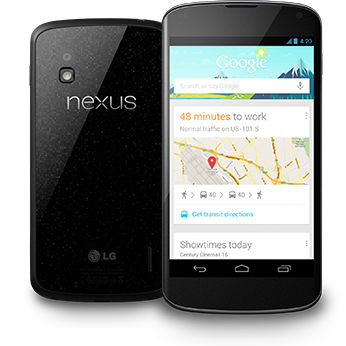
Well, recently, I’ve hit the jackpot in the form of Google Wallet on my lovable Nexus 4.
Basically, what it allows me to do is to just tap my phone to the credit card payment terminal and (with a pre-selected card—I have 4 loaded in) pay for whatever it is. No physical card required.
The receipt shows up on my phone (and I get an email later as well). That’s very cool, but what’s REALLY cool is the reaction I get from people.
I imagine (or so I tell myself) that it’s similar to the way people must have reacted when they saw a plane or a car for the first time many years ago.
Jaws drop and they routinely say “What is that?! How did you do that?”
And, for a slight moment, I get to feel like I am visiting from the future.
It happened at BWI rail station recently and I got the guy (Mike) on video describing it.
Pretty soon, this will be commonplace, but for now, I get to ride the wave and get payback for all of those nights when stuff just didn’t work.
People often ask me the “secret” to some of the things I do, particularly when it comes to information management.
I’ve blogged before on the technologies I use (see here), but today I want to talk about the value of having a great technologist at your disposal.
And, I’m not talking about a friend you can call…I am talking about someone you hire, even for your personal life, but definitely for your professional life.
You pay for a trainer at the gym, a doctor or a therapist, but having a great technologist at your disposal can help you save a ton of time and probably advance your career.
Today, I want to talk about Ron Braatz from LiftOff.
I’ve known Ron from my Microsoft days, but recently he showed me the value of a great technologist by helping me migrate an Exchange server installation to Microsoft Online.
What that is…doesn’t matter. What it does is save me $450/year in fees, increase my speed and reliability, and make me even more productive.
I could have done it myself, but what Ron showed is that even in “self-serve” technology, you need a guiding hand, someone who can advise you and save you time.
It’s no surprise that he’s one of the top-ranked “cloud” providers of all Microsoft services.
If you have a business-of any size-and you want to understand how to use your technology better, give Ron a call.
Either way, find a great technologist and pay him/her to help you get better.
I don’t need to tell you that it’s a competitive advantage…so don’t skimp.
In my fearless effort to discover new ways to exploit technology, I bought a device from a company called Karma.
The basic idea is this:
Sounds like a good deal and it could be.
The coverage and connection speed (provided by Clearwire) are adequate. The trick is that it’s an MLM for bandwidth.
I don’t have too many occasions when I am surrounded by people who are hungry for bandwidth who might connect to my open “Jeremy-Karma” network, but I figured the Amtrak Acela from DC to NYC was a great opportunity.
It’s full of businesspeople and wi-fi on Amtrak is, well, horrid.
I left the hotspot on the entire trip (deliberately sat in the middle of the car) and got all of ZERO sign-ups.
Hmmm…
After you use your 1GB of data, then it’s $14 for each additional 1GB.
Not the end of the world and I like being out of contract with no monthly, but I will admit that I was hoping for tons of free data due to sign ups. Oh well.
It is possible that I picked the wrong market for this test…a lot of ppl have their own mobile hotspots on Acela or maybe ppl just don’t look for/trust open networks.
I’ll keep trying and let you know.
Well, no longer live, as it’s done, but thanks to Dr. Sonny Goel (twitter/FB), I’m now at 20/15 vision and on the road to full recovery. Sonny has, I’m told, performed more Lasik operations than anyone in the entire US…but until now, none of them had been livestreamed!
At one point, we had (I’m told) 35 people watching the livestream of the actual surgery. We also made it a social event, but enabling comments and even fielding questions from the virtual audience.
To get right to the meat of the video, see here. For the full effect, you can watch below or here.
Highly recommend Lasik Plus in Columbia, MD.
Ok, so let’s leave aside the fact that it comes unlocked, thereby allowing me to save close to $1k a year in cell phone service charges. That’s the easy part.
Now, here’s why the Nexus 4 is the best phone I’ve ever owned and why it just may be the best phone on the market.
Now, I’m no Apple-hater, I have 2 iPads, but the flexibility and horsepower of this device…I’ll take it head to head on an iPhone 5 any day.
I joke with my kids that I can’t decide if I love them or the phone more. (Don’t tell them it’s a joke please).
It took a lot of effort to get this phone, but it was worth it.
If you’re sick of feeling like you are overpaying for cell service and don’t like being beholden to wireless carriers, then this post is for you.
My 2 year Sprint contract ended last July and I was determined to not go under contract with anybody again..
I wanted flexibility in my plan. I wanted cutting-edge technology. And I didn’t want to spend through the nose for it.
Here’s how I managed to pull it off.
The Pros
On the other points that you are sure to ask…
Call Quality
Straight Talk is an AT&T reseller and, so far, I have to say that the call/coverage quality has been fine. In fact, I used it all the way down/back to South Carolina and there was only a period of about 4 minutes the whole way when I didn’t have coverage.
Data
So, Straight Talk says they are “unlimited” data. Some research on line says that IF you go above 2GB, they will throttle you. Personally, I think I’ve gone over 2GB in one month maybe once in the past 3 years, so I am not super concerned about that. I do monitor usage and I do tend to switch off mobile data and turn on wi-fi when I am in the house.
Customer Service/Number Portability
Moving the number was very easy. Ridiculously easy. I did have a customer service issue and though I did have to wait about 10 mins, I found the agent to be extremely friendly, knowledgeable, and helpful. She was in Guatemala. Issue resovled.
The Cons
There really aren’t too many. You can get your phone from StraightTalk, if you want, but if you bring your own, you have a DIY solution which means that the Operating System, the phone manufacturer, and the carrier are all divorced from each other.
Frankly, I think phones are pretty much at the maturation point where that doesn’t really matter, but some people may want a place to go (like a Verizon store) for service and questions.
Bottom Line
Do the math….if you are out of contract, you are better off buying an unlocked phone on eBay and getting a pre-paid plan than paying through the nose (and being locked in) to a wireless carrier. And, now, what Google has done, in my opinion, is going to open the floodgates in terms of having access to lower cost, top of the line phones.
And when you’ve saved all that money, you can feel free to make a donation to my coffee fund
Note: This a Public Service Announcement with a cash incentive for both of us.
Many of you probably obtained new gadgets (phones, iPads, Kindles, etc.) over the past few weeks and months.
And now, you probably have your previous device sitting somewhere, unloved, on a table or in a desk and doing nothing for you.
Well, thanks to a friend of mine, I discovered a site called TechPayout.com (use promo code “NeverStop” for a $5 bonus if you visit) where you can sell your old devices quickly and easily and have the money sent as a check or PayPal.
I’ve sold plenty of stuff on eBay and while I was a bit reluctant to try out this site, I did anyway and I was blown away by how simple, fast, and easy it was.
Whole thing probably took less than 5 minutes.
I sold my 2 year old EVO 4G for $41 (which was about $35 more than I thought I could ever get) and even if it is a few dollars less than you could get elsewhere, the simplicity of it all makes it worthwhile.
And I figure that cash is better than having old devices lying around your house unused..
So, if you do visit TechPayout.com (please use promo code “NeverStop” for your $5 bonus. Disclosure: I am an affiliate now, so will make some money on this as well).
Picked up a new niece about 2 weeks ago…now my kids have 24 first cousins.
The special part about this one is how we met.
My sister called me from the hospital and gave me the wonderful news. Then, she said, “Do you want to FaceTime with her?”
6 hours old and already doing videoconferencing.
A new world record.
I sat there for 5 minutes, staring at the screen.
My computer was working fine, optimized after 1.5 years of refinement. I should just leave well enough alone, right?
Yet, here I was, staring at the “Next” button…the one that would being the installation of Windows 8 over my Windows 7 OS, hurtling me into the unknown world of a new technology and about to commit to crossing the chasm from which there was turning back…but one that could involve hours of digging out and recovery.
I had been down this road before.
I had been to the abyss of data loss and non-working machines. Yet, each time, I had come back…stronger and better, feeling empowered that I had developed a stronger understanding of the underlying technology.
And, further, I was committed to forcing the creation of new neural pathways, getting me out of my “comfort zone,” convinced, like a junkie of technology, that the next thing would give me a bigger rush, reason enough to push forward.
And, so I did…
I pushed the button and didn’t look back, off on the next adventure.
How did it go?
A post for another day.
The last of Stephen Covey’s “7 Habits of Successful People” is Sharpen the Saw.
It’s something I advocate a lot when I teach marketing classes and something that I also struggle with working into my schedule.
Every now and then though, I wake up in the middle of the night having a mild innovation panic attack where I think to myself, “there’s a big wave of change coming and I feel like I am behind.”
In this case, the technology on which I didn’t feel like I have a good enough grip was HTML 5.
In hindsight, it was a combination of factors pushed me to set aside an entire morning to investigate and play around with it using the W3 tutorial.
First off, I read Fred Wilson’s post on “Program or Be Programmed.”
Coming on the heels of my trips to China and India, it really struck a chord with me.
It’s one thing to know how to use the technology (here are my guides on how I use software and hardware), but it’s another thing ENTIRELY to understand how it all works.
Fred’s link to Code Academy set me off and I spent a few hours improving my JavaScript. I’m far from an expert, but I did get a bit better. (here’s my profile)
Then, I saw a fantastic presentation by Roger McNamee from TEDxSantaCruz on “Disruption and Engagement.” He had 6 big trends…the last, and most important of which, was HTML 5.
So, am I an expert in HTML5?
Not by any stretch. You can take a look at my little, simplistic effort here. In fact, at the time of this post, the video wasn’t working, but that doesn’t matter. That page is nothing earth shattering, but that’s not the point. (note: not all browsers support HTML5 yet).
The point isn’t to become an expert in HTML5 (or any other technology).
The point is that at least a decent understanding of how it works and what it can do will (I hope) allow me to discover innovative solutions to business (and other) problems.
Remember, if the question is “How do you do…?” The answer is “Google” or “Bing” (hey, got to show the love to MS ).
All of us can do it…it’s just a question of making it a priority.
And with China and India raising the stakes in terms of the need for personal and national competitiveness, it must be.

Have had it for a few days now and here’s my take on it.
I like the size. I was walking around the National Gallery of Art and it fit in the pocket of my jeans. It also fits in the inside pocket of a jacket or neatly in a purse (I would think).
Battery life is fine. Not spectacular, but it works.
Screen is nice. Colors are great/vivid and the integration with Amazon stuff (of course) is first-rate. Videos and their cloud music service plus books, of course.
It is a bit heavier than I would have expected, but manageable and you can hold it with one hand.
For pure reading, I prefer the regular Kindle.
The downside?
The system, on occasion, does get a bit choppy and it’s frozen on me twice so far. No camera, no bluetooth. You also can’t get every Android app that you can get on a smartphone.
So, I guess the ultimate question is: Kindle Fire or iPad2?
Obviously, it comes down to budget and whether you’ll get $300 worth of extra value from the iPad. Personally, I would say yes, you would, but then again, it’s your money, not mine.
If, however, you are saying “I’d like a tablet like reader/viewer on which to purely consume content when I have a wi-fi connection,” then the Fire will do the trick for you.
It’s a solid first effort by Amazon, but it’s the first effort and will certainly improve down the road.

I borrowed a library book the other day.
No big deal, you might say.
Thing is, I borrowed it on my Kindle.
And that IS a big deal.
Here’s how you can do it if you live in Maryland.
Since the Great Library of Alexandria, knowledge dissemination through books has been a cornerstone of civilization.
Now, the ability to disseminate knowledge but not be constrained by the actual requirement to have a physical book (sure you need a Kindle, but that’s easier and cheaper for all of us…better to give 1 Kindle to every citizen than buy 10,000 books and put them in a library).
Felt like a watershed moment.
I saw this mobile app a few months ago and rediscovered it recently.
It’s called Waze (they have iPhone, Android, Blackberry, and Nokia versions) and basically what it allows you to do is get real-time traffic and route information from OTHER drivers on the road.
Meanwhile, your phone (anonymously) is contributing information about your speed as well to the service.
So, in essence, we all benefit because we all are telling the network “here’s how fast the traffic is moving on this road at this time” (thanks to GPS, the phone knows where you are.)
I just think it’s pretty neat and potentially a lot more reliable.
Perfect example of the Mesh, btw.